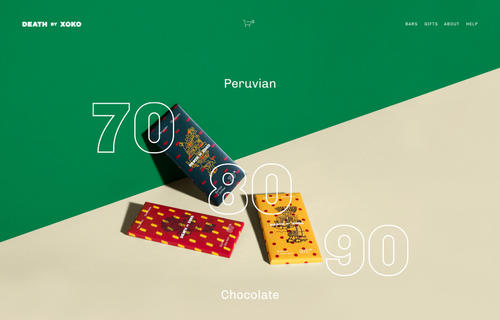
Cacao Template: A website template with simplified structure ideal for presenting products in a powerful way.
Notes
1. Adding Custom CSS to Home > Design > Custom CSS
2. Adding !important to after, if CSS doesn’t work! for example: font-size: 20px !important;
3. If it still doesn’t work, send me a message via Contact Form with your site url. I’ll give you exact CSS..
4. How to find Page ID: https://beaverhero.com/squarespace-how-to/
body#collection-56d86c682b8dde72910d59bd is Page ID. Each page will have different ID
Header
Remove Logo
Entire Site
.Header-branding {
    visibility: hidden;
}
a.Mobile-bar-branding {
    visibility: hidden;
}
One Page
body#collection-58b5ed10bf629a356f09728a .Header-branding {
    visibility: hidden;
}
body#collection-58b5ed10bf629a356f09728a a.Mobile-bar-branding {
    visibility: hidden;
}
Change Logo for Certain Pages
/* Desktop */
.Header-branding {
    visibility: hidden;
}
.Header-branding:after {
    visibility: visible;
    content: "";
    background-image: url(https://image.flaticon.com/icons/svg/1279/1279537.svg);
    background-size: contain;
    background-position: center center;
    background-repeat: no-repeat;
    width: 98px;
    height: 48px;
    display: block;
}
/* Mobile */
.Mobile-bar-branding {
    visibility: hidden;
}
.Mobile-bar-branding:before {
    visibility: visible;
    content: "";
    background-image: url(https://image.flaticon.com/icons/svg/1279/1279537.svg);
    background-size: contain;
    background-position: center center;
    background-repeat: no-repeat;
    display: block;
    height: 50px;
    width: 100px;
}
Navigation Hover Color
Entire Site
.Header-nav-item:hover {
    color: #ff0000 !important;
}
One Page
body#collection-560d9d7ae4b079ff1a2e6eaa .Header-nav-item:hover {
    color: #ff0000 !important;
}
Navigation Background Color
Entire Site
.Header-nav {
    background: #000;
}
One Page
body#collection-560d9d7ae4b079ff1a2e6eaa .Header-nav {
    background: #000;
}
Remove Navigation
Entire Site
.Header-nav {
    display: none;
}
One Page
body#collection-58b5ed10bf629a356f09728a .Header-nav {
    display: none;
}
Header Background Color
Entire Site
.Header.Header--bottom {
    background: #f1f2f3;
}
.Mobile-bar {
    background: #f1f2f3;
}
One Page
body#item-58a214273e00bea4494186a7 .Header.Header--bottom {
    background: #f1f2f3;
}
body#item-58a214273e00bea4494186a7 .Mobile-bar {
    background: #f1f2f3;
}
Remove Header
Entire Site
.Mobile-bar {
    display: none;
}
.Header.Header--bottom {
    display: none !important;
}
One Page
body#item-58a214273e00bea4494186a7 .Mobile-bar {
    display: none;
}
body#item-58a214273e00bea4494186a7 .Header.Header--bottom {
    display: none !important;
}
Change Cart Icon Color
Entire Site
span.Cart-inner svg {
    fill: #ff0000;
    stroke: #ff0000;
}
One Page
body#collection-57ac9c791b631ba91fce7a38 span.Cart-inner svg {
    fill: #ff0000;
    stroke: #ff0000;
}
Change Hamburger Icon
button.Mobile-bar-menu svg {
    stroke: #ff0000;
}
Replace Hamburger Icon with word “Menu”
button.Mobile-bar-menu {
    visibility: hidden;
}
button.Mobile-bar-menu:after {
    visibility: visible;
    content: "Menu";
    font-family: proxima-nova;
    color: #000;
    font-size: 20px;
}
Replace Hamburger Icon with Custom Icon/Image
button.Mobile-bar-menu {
    visibility: hidden;
}
button.Mobile-bar-menu:after {
    visibility: visible;
    content: "";
    background-image: url(https://image.flaticon.com/icons/svg/1279/1279537.svg);
    background-repeat: no-repeat;
    background-size: contain;
    background-position: center center;
    width: 30px;
    height: 30px;
    display: block;
}
Add word “Menu” beside Hamburger Icon
button.Mobile-bar-menu:before {
    content: "Menu";
    font-size: 20px;
    color: #000;
    position: absolute;
    right: 50px;
    top: 25px;
}
Navigation Overlay Color
Entire Site
.Mobile-overlay-menu {
    background: #f1f2f3;
}
.Mobile-overlay {
    background: #f1f2f3 !important;
}
button.Mobile-overlay-close {
    background: #f1f2f3 !important;
}
One Page
body#collection-560d9d7ae4b079ff1a2e6eaa .Mobile-overlay-menu {
    background: #f1f2f3;
}
body#collection-560d9d7ae4b079ff1a2e6eaa .Mobile-overlay {
    background: #f1f2f3 !important;
}
body#collection-560d9d7ae4b079ff1a2e6eaa button.Mobile-overlay-close {
    background: #f1f2f3 !important;
}
Navigation Overlay With
.Mobile-overlay {
    width: 70%;
}
Mobile Header Background Color
Entire Site
.Mobile-bar {
    background: #f1f2f3;
}
One Page
body#collection-57ac9c791b631ba91fce7a38 .Mobile-bar {
    background: #f1f2f3;
}
Sticky Mobile Header
.Mobile-bar {
    position: fixed;
    top: 0;
    left: 0;
    right: 0;
    z-index: 999;
    bottom: unset;
}
Footer
Footer Background Color
Entire Site
footer.Footer {
    background: #000;
}
One Page
body#collection-58b5ed10bf629a356f09728a footer.Footer {
    background: #000;
}
Footer Background Image
Entire Site
footer.Footer {
    background-image: url(https://beaverhero.com/wp-content/uploads/2019/07/coffee-beans-1082116_640-min.jpg);
    background-size: cover;
    background-position: center center;
    background-repeat: no-repeat;
}
One Page
body#collection-58b5ed10bf629a356f09728a footer.Footer {
    background-image: url(https://beaverhero.com/wp-content/uploads/2019/07/coffee-beans-1082116_640-min.jpg);
    background-size: cover;
    background-position: center center;
    background-repeat: no-repeat;
}
Remove Footer
Entire Site
footer.Footer {
    display: none !important;
}
One Page
body#collection-58b5ed10bf629a356f09728a footer.Footer {
    display: none !important;
}
Shop
Remove Add to Cart
Entire Site
.sqs-add-to-cart-button-wrapper {
    display: none !important;
}
One Page
body#collection-57ac9c791b631ba91fce7a38 .sqs-add-to-cart-button-wrapper {
    display: none !important;
}
Remove Quantity Input
Entire Site
.product-quantity-input {
    display: none;
}
One Page
body#collection-57ac9c791b631ba91fce7a38 .product-quantity-input {
    display: none;
}
Featured Image: Squarespace.com